Használati útmutató Extron MBU 149
Extron
nincs kategorizálva
MBU 149
Olvassa el alább 📖 a magyar nyelvű használati útmutatót Extron MBU 149 (3 oldal) a nincs kategorizálva kategóriában. Ezt az útmutatót 10 ember találta hasznosnak és 5.5 felhasználó értékelte átlagosan 3.6 csillagra
Oldal 1/3
Setup Guide — MBU 149
(Continued on reverse side)
The Extron
®
MBU 149 Under-Desk Mount Kit (part number
70-222-01) lets you attach an Extron 1U high device to the
underside of a desk or table, or to a wall. The brackets
extend approximately ¼" (6 mm) above the top surface of the
device, which allows an air space between the enclosure and
the mounting surface.
Installation
Step 1 — Attach brackets to device
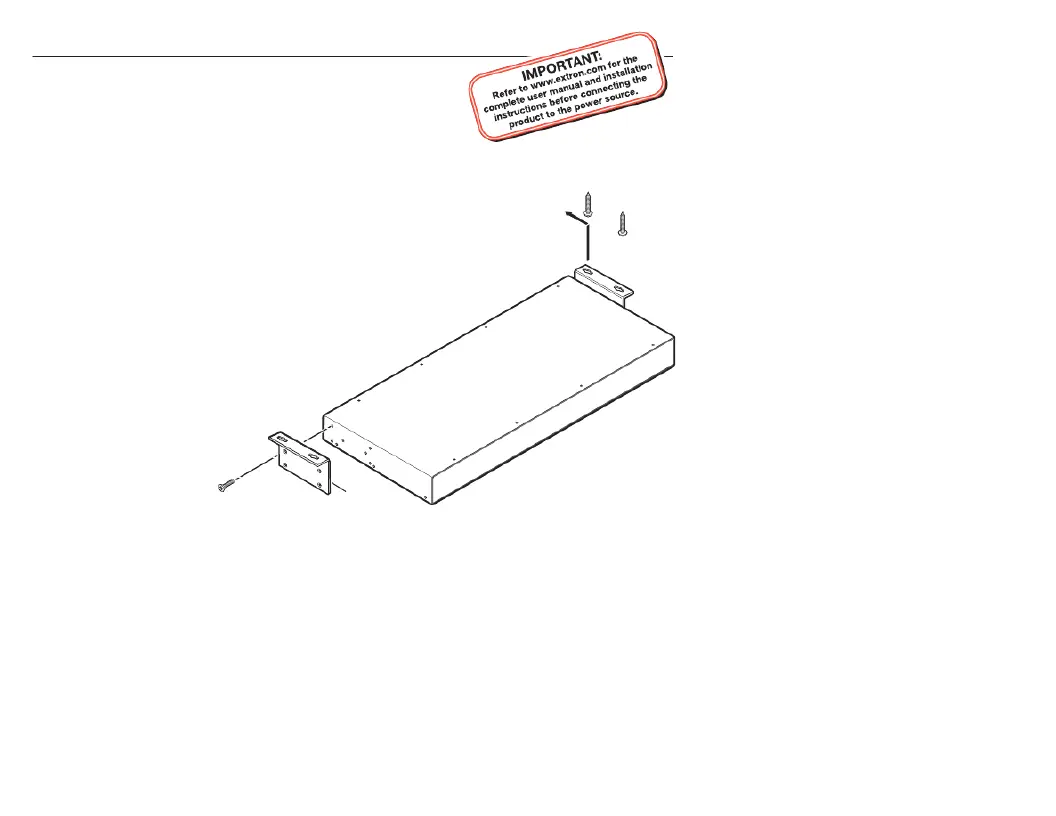
Attach brackets to the device with the supplied machine
screws, as shown on the left side of the picture below.
Step 2 — Mark screw location
Hold the device with attached brackets against the
wall or the underside of the furniture, and
mark the screw hole locations (centers of
the brackets’ screw slots).
Step 3 — Drill holes
Drill four pilot
holes, each
3/32" (2 mm)
in diameter, ¼"
(6 mm) deep,
at the locations
marked in step .2
#8 Screw
(4 Places)
Each Side
Mounting Screws
(2 Places)
Each Side
Mounting
Bra tcke
Termékspecifikációk
| Márka: | Extron |
| Kategória: | nincs kategorizálva |
| Modell: | MBU 149 |
Szüksége van segítségre?
Ha segítségre van szüksége Extron MBU 149, tegyen fel kérdést alább, és más felhasználók válaszolnak Önnek
Útmutatók nincs kategorizálva Extron

2 Április 2025

2 Április 2025

2 Április 2025

2 Április 2025

11 Január 2025

11 Január 2025

7 Január 2025

7 Január 2025

7 Január 2025

4 Január 2025
Útmutatók nincs kategorizálva
- nincs kategorizálva Creamsource
- nincs kategorizálva Advanced Network Devices
- nincs kategorizálva Chenbro Micom
- nincs kategorizálva Evenflo
- nincs kategorizálva Mount-It!
- nincs kategorizálva K&K Sound
- nincs kategorizálva Hyundai
- nincs kategorizálva DeLock
- nincs kategorizálva Ionmax
- nincs kategorizálva LELO
- nincs kategorizálva Junkers
- nincs kategorizálva PAC
- nincs kategorizálva Livn
- nincs kategorizálva AKG
- nincs kategorizálva GYS
Legújabb útmutatók nincs kategorizálva

10 Április 2025

10 Április 2025

10 Április 2025

9 Április 2025

9 Április 2025

9 Április 2025

9 Április 2025

9 Április 2025

9 Április 2025

9 Április 2025