Használati útmutató StarTech.com ST122HD4K
StarTech.com
nincs kategorizálva
ST122HD4K
Olvassa el alább 📖 a magyar nyelvű használati útmutatót StarTech.com ST122HD4K (2 oldal) a nincs kategorizálva kategóriában. Ezt az útmutatót 14 ember találta hasznosnak és 7.5 felhasználó értékelte átlagosan 4.6 csillagra
Oldal 1/2
Instruction Manual
DE: Bedienungsanleitung - de.startech.com
FR: Guide de l'utilisateur - fr.startech.com
ES: Guía del usuario - es.startech.com
IT: Guida per l'uso - it.startech.com
NL: Gebruiksaanwijzing - nl.startech.com
PT: Guia do usuário - pt.startech.com
Manual Revision: 02/13/2018
For the most up-to-date information, please visit: www.startech.com
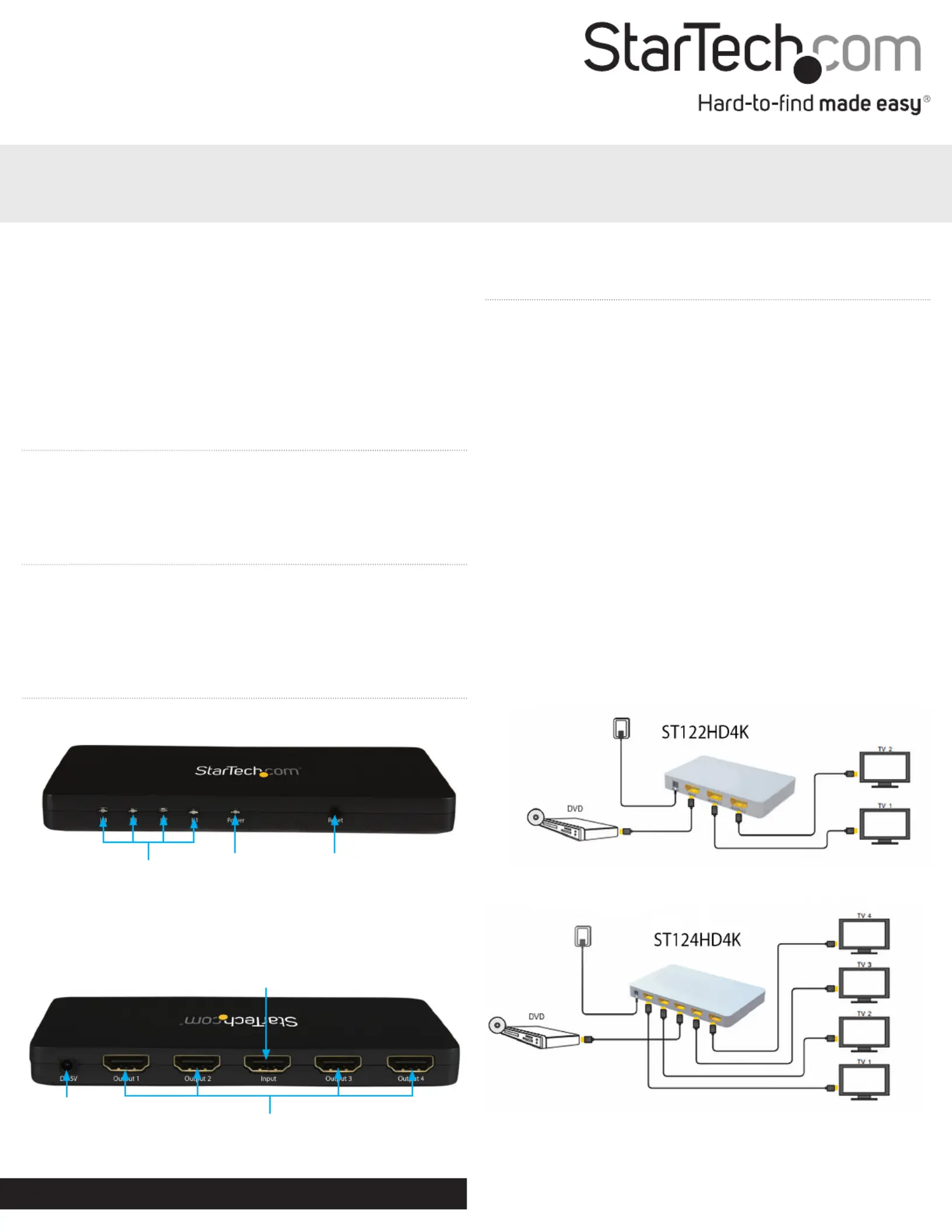
Port
activity LEDs
Power LED
Reset Button
Packaging Contents
• 1x HDMI Audio/Video Splitter (ST122HD4K/ST124HD4K)
• 1x Power Adapter (NA/EU/UK/AUS)
• 1x Instruction Manual
System Requirements
• 1x HDMI-enabled Video Source Device w/ HDMI cable
(i.e. Blu-ray player, computer, etc.)
• 4x HDMI-enabled Display Device w/ cable (i.e. Television,
projector, etc.)
ST124HD4K / ST122HD4K
Split an HDMI audio/video source to multiple HDMI Displays simultaneously, with
support for resolutions up to 4K
*actual product may vary from photos
Product Overview
Front View - ST124HD4K
Rear View - ST124HD4K
Hardware Installation
Note: Ensure your HDMI-enabled video source device, and the
HDMI-enabled Display Devices are powered o before you begin
installation.
1. Connect an (not included) from the A/V output of HDMI cable
your HDMI-enabled Video Source Device A/V input Port to the
on the HDMI Audio/Video Splitter.
2. Connect an (not included) from the on HDMI cable output ports
the HDMI Video Splitter to each desired HDMI-enabled Display
Device (up to 2 on ST122HD4KS) (up to 4 on ST124HD4KS).
Note: Each port is numbered, please take note of which number
is assigned to each HDMI-enabled display device.
3. Power on each , followed by your HDMI-enabled Display Device
HDMI-enabled Video Source Device.
4. Connect the included power adapter from an available power
source to the power adapter port HDMI Audio/Video on the
Splitter.
5. Your Video source device A/V output will now appear on each
attached HDMI-enabled display device.
Power
adapter port
A/V output
ports
A/V input
port
Termékspecifikációk
| Márka: | StarTech.com |
| Kategória: | nincs kategorizálva |
| Modell: | ST122HD4K |
Szüksége van segítségre?
Ha segítségre van szüksége StarTech.com ST122HD4K, tegyen fel kérdést alább, és más felhasználók válaszolnak Önnek
Útmutatók nincs kategorizálva StarTech.com

18 Március 2025

18 Március 2025

10 Január 2025

10 Január 2025

10 Január 2025

10 Január 2025

10 Január 2025

10 Január 2025

10 Január 2025

10 Január 2025
Útmutatók nincs kategorizálva
- nincs kategorizálva Gima
- nincs kategorizálva Quartet
- nincs kategorizálva Lynx
- nincs kategorizálva Sagitter
- nincs kategorizálva ZTE
- nincs kategorizálva Kanto
- nincs kategorizálva EarthQuaker Devices
- nincs kategorizálva Starlink
- nincs kategorizálva TK Audio
- nincs kategorizálva Scandomestic
- nincs kategorizálva Softing
- nincs kategorizálva Bikemate
- nincs kategorizálva ProfiCook
- nincs kategorizálva Kopp
- nincs kategorizálva Sven
Legújabb útmutatók nincs kategorizálva

10 Április 2025

10 Április 2025

10 Április 2025

9 Április 2025

9 Április 2025

9 Április 2025

9 Április 2025

9 Április 2025

9 Április 2025

9 Április 2025