Használati útmutató Sena Prism Tube Wifi
Sena
nincs kategorizálva
Prism Tube Wifi
Olvassa el alább 📖 a magyar nyelvű használati útmutatót Sena Prism Tube Wifi (2 oldal) a nincs kategorizálva kategóriában. Ezt az útmutatót 17 ember találta hasznosnak és 9 felhasználó értékelte átlagosan 4.6 csillagra
Oldal 1/2
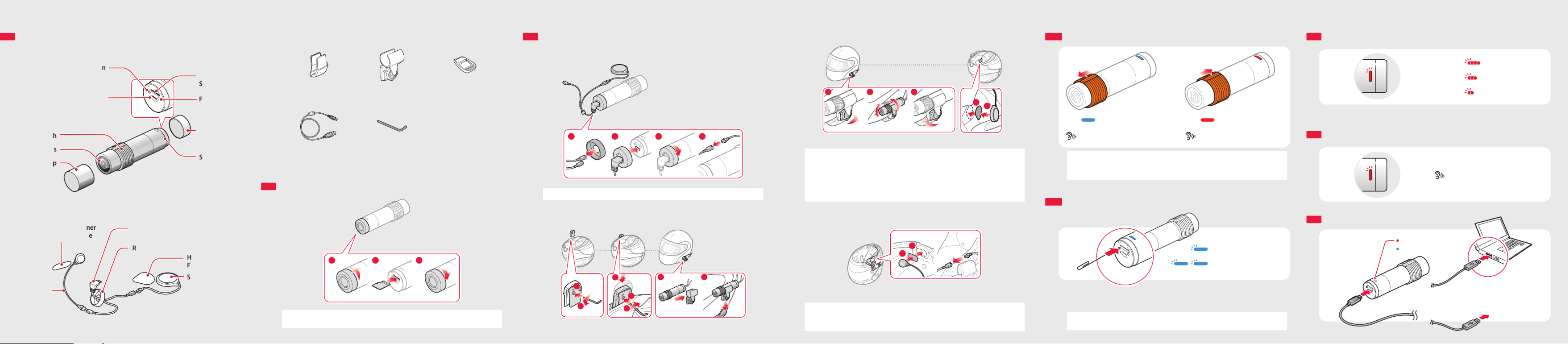
PREPARATION
Getting to Know the Prism Tube WiFi Layout
Camera
Lens Cap
Lens
Slide Switch
SD Card Format Button
DC Power Charging &
Firmware Upgrade Port
tatus LEDS
Rear Cap
ault Reset F
Pin-hole Button
MicroSD Card
lotS
Speaker and Microphone
peakerS
Wired
Microphone
ook and Loop H
astener for SpeakerF
ear Cap for USB CableR
USB Cable for Speaker &
Microphone
Hook and Loop Fastener
for Wired Microphone
Installing the Prism Tube WiFi System
Connecting the Speaker
1 42 3
Note Connect the speaker cable to the USB cable’s black connector.
Mounting
Clamp Unit Camera
1
2
1
2
3
1 2
BASIC OPERATION
Turning the Camera On or O
ON OFF
“Camera on”, “Recording” “Camera o”
Note • Recording will start shortly after the camera is turned on. Recording stops
shortly before the camera is turned o.
• A microSD card must be inserted to record video.
Switching Between Normal Recording and Loop Recording
Normal Recording
Loop Recording
After the camera is turned on, tap the SD Card Format Button to switch between
normal recording mode and loop recording mode.
Note The Blue LED blinks once during normal recording and twice during loop
recording.
Adjusting the Angle Speaker
1 2 3
12
Note • The tube swivel mount wheel must be fully tightened after adjusting the
camera angle.
• Make sure the tip of the slide switch faces upwards and is parallel to the
ground.
• You can use the glued surface mounting plate to attach the clamp unit to
the surface of the helmet. Full adhesion is achieved after 24 hours.
Connecting the Wired Microphone
1
2
To record your voice more clearly, connect the wired microphone.
Note • Connect the wired microphone cable to the USB cable’s red connector.
• The camera’s internal microphone automatically turns on when the wired
microphone is disconnected.
Others
Clamp Unit Tube Swivel Mount Glued Surface
Mounting Plate
USB Power & Data Cable Allen Wrench
Inserting a MicroSD Card
1 2 3
Note MicroSD cards up to 64GB are compatible. Using a Class 10 microSD card is
suggested.
BATTERY
Checking the Battery Level
Blinking Blinking
70~100%
Blinking
30~70%
Blinking
0~30%
Turn on the camera and check the battery level via the .Status LED
Low Battery Warning
Blinking
“Battery low”
Charging the Battery
Charging
Fully charged
AC adapter
or
Termékspecifikációk
| Márka: | Sena |
| Kategória: | nincs kategorizálva |
| Modell: | Prism Tube Wifi |
Szüksége van segítségre?
Ha segítségre van szüksége Sena Prism Tube Wifi, tegyen fel kérdést alább, és más felhasználók válaszolnak Önnek
Útmutatók nincs kategorizálva Sena

8 Január 2025

24 December 2024

8 Szeptember 2024

3 Szeptember 2024

2 Szeptember 2024

1 Szeptember 2024

16 Augusztus 2024

10 Augusztus 2024

9 Augusztus 2024

8 Augusztus 2024
Útmutatók nincs kategorizálva
- nincs kategorizálva Gre
- nincs kategorizálva Silhouette
- nincs kategorizálva Hedbox
- nincs kategorizálva Micro Matic
- nincs kategorizálva Cinderella
- nincs kategorizálva Palmer
- nincs kategorizálva Helix
- nincs kategorizálva Seymour Duncan
- nincs kategorizálva Ebro
- nincs kategorizálva Atmotube
- nincs kategorizálva Hive
- nincs kategorizálva Stalco
- nincs kategorizálva Café
- nincs kategorizálva Planet Audio
- nincs kategorizálva Hikvision
Legújabb útmutatók nincs kategorizálva

10 Április 2025

10 Április 2025

10 Április 2025

9 Április 2025

9 Április 2025

9 Április 2025

9 Április 2025

9 Április 2025

9 Április 2025

9 Április 2025