Használati útmutató Samsung HG65BU800AJ
Samsung
nincs kategorizálva
HG65BU800AJ
Olvassa el alább 📖 a magyar nyelvű használati útmutatót Samsung HG65BU800AJ (2 oldal) a nincs kategorizálva kategóriában. Ezt az útmutatót 8 ember találta hasznosnak és 4.5 felhasználó értékelte átlagosan 4.4 csillagra
Oldal 1/2
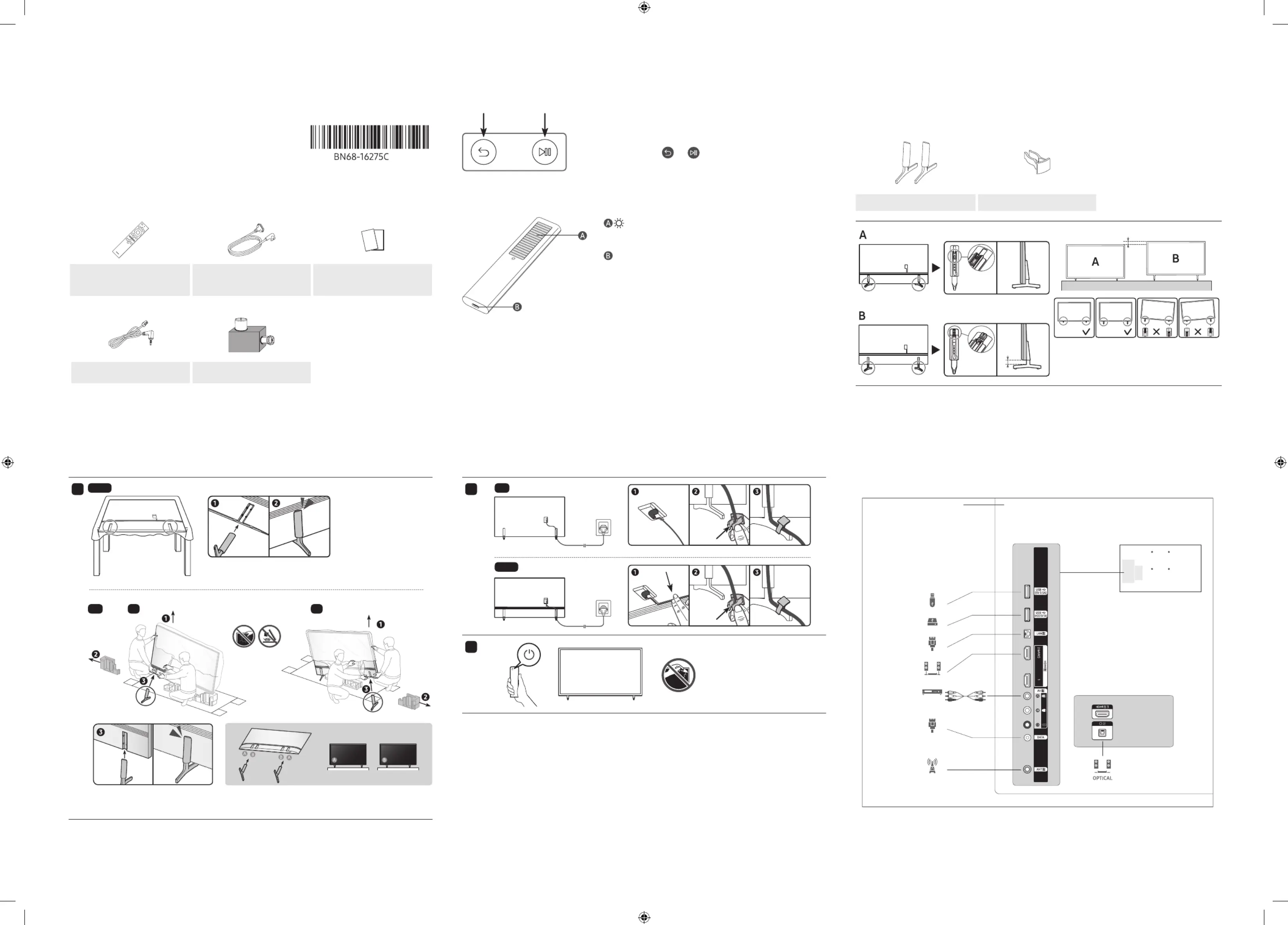
1. List of Parts
• The provided accessories may vary depending on the model.
1 2 3
Samsung Smart Remote Power Cable
Warranty Card / Quick Setup Guide /
Regulatory Guide
(Not available in some locations)
4 5
Data Cable
(Not available in some locations)
Antenna adapter
2. The Samsung Smart Remote
Pairing the TV to the Samsung Smart Remote
When you turn on the TV for the first time, the Samsung Smart Remote pairs
to the TV automatically. If the Samsung Smart Remote does not pair to the TV
automatically, point it at the remote control sensor of the TV, and then press
and hold the buttons labelled
and as shown in the figure on the left
simultaneously for 3 seconds or more.
Charging the battery
Solar Cell
Expose to light when the remote is not in use. This will extend the remote's
operating time.
USB port (C-type) for charging
Used for quick charging. The LED on the front will light when charging.
When the battery is fully charged, the LED will turn off.
• The USB Cable is not provided.
– It is recommended to use an original Samsung charger. Otherwise, it may cause performance degradation or failure
of the product. In this case, the warranty service is not applicable.
– When the remote control does not work due to low battery, charge it by using the USB-C type port.
3. Installing the LED TV Stand
Assembling the Stand and Components
When installing the stand, use the provided components and parts.
Stand Holder-Cable x 2
25 mm
• Place a soft cloth over the table to protect the
TV, and then place the TV so that its screen faces
down toward the table surface.
1
43-65"
75″ L R
• Insert the Stands into the slot on the bottom of the TV.
• Slide and assemble it to the end line in the direction of arrow.
Quick Setup Guide
To register this product please visit www.samsung.com
-00
2
43″
50-75″
3
NOTE
• Make sure to distinguish between the front and back of each component when assembling them.
• Make sure that at least two persons lift and move the TV.
4. The Connection Panel
O
HDD
ARC
USB
LAN
ANT IN
DATA
AV
BACK OF TELEVISION
Termékspecifikációk
| Márka: | Samsung |
| Kategória: | nincs kategorizálva |
| Modell: | HG65BU800AJ |
Szüksége van segítségre?
Ha segítségre van szüksége Samsung HG65BU800AJ, tegyen fel kérdést alább, és más felhasználók válaszolnak Önnek
Útmutatók nincs kategorizálva Samsung

8 Április 2025

3 Április 2025

30 Március 2025

29 Március 2025

29 Március 2025

28 Március 2025

28 Március 2025

27 Március 2025

27 Március 2025

16 Március 2025
Útmutatók nincs kategorizálva
- nincs kategorizálva Roller Grill
- nincs kategorizálva Saitek
- nincs kategorizálva Gretsch Guitars
- nincs kategorizálva Black Decker
- nincs kategorizálva ProfiCare
- nincs kategorizálva Wentronic
- nincs kategorizálva Tamron
- nincs kategorizálva Kaiser Nienhaus
- nincs kategorizálva Yukon
- nincs kategorizálva Minix
- nincs kategorizálva OSD Audio
- nincs kategorizálva Rosieres
- nincs kategorizálva Alecto
- nincs kategorizálva Sure-Fi
- nincs kategorizálva Parkside
Legújabb útmutatók nincs kategorizálva

10 Április 2025

10 Április 2025

10 Április 2025

9 Április 2025

9 Április 2025

9 Április 2025

9 Április 2025

9 Április 2025

9 Április 2025

9 Április 2025