Használati útmutató Roland Edirol Motion Dive.tokyo Console MD-P1
Roland nincs kategorizálva Edirol Motion Dive.tokyo Console MD-P1
Olvassa el alább 📖 a magyar nyelvű használati útmutatót Roland Edirol Motion Dive.tokyo Console MD-P1 (4 oldal) a nincs kategorizálva kategóriában. Ezt az útmutatót 13 ember találta hasznosnak és 6 felhasználó értékelte átlagosan 4.1 csillagra
Oldal 1/4
motion dive .tokyo console Owner’s Manual
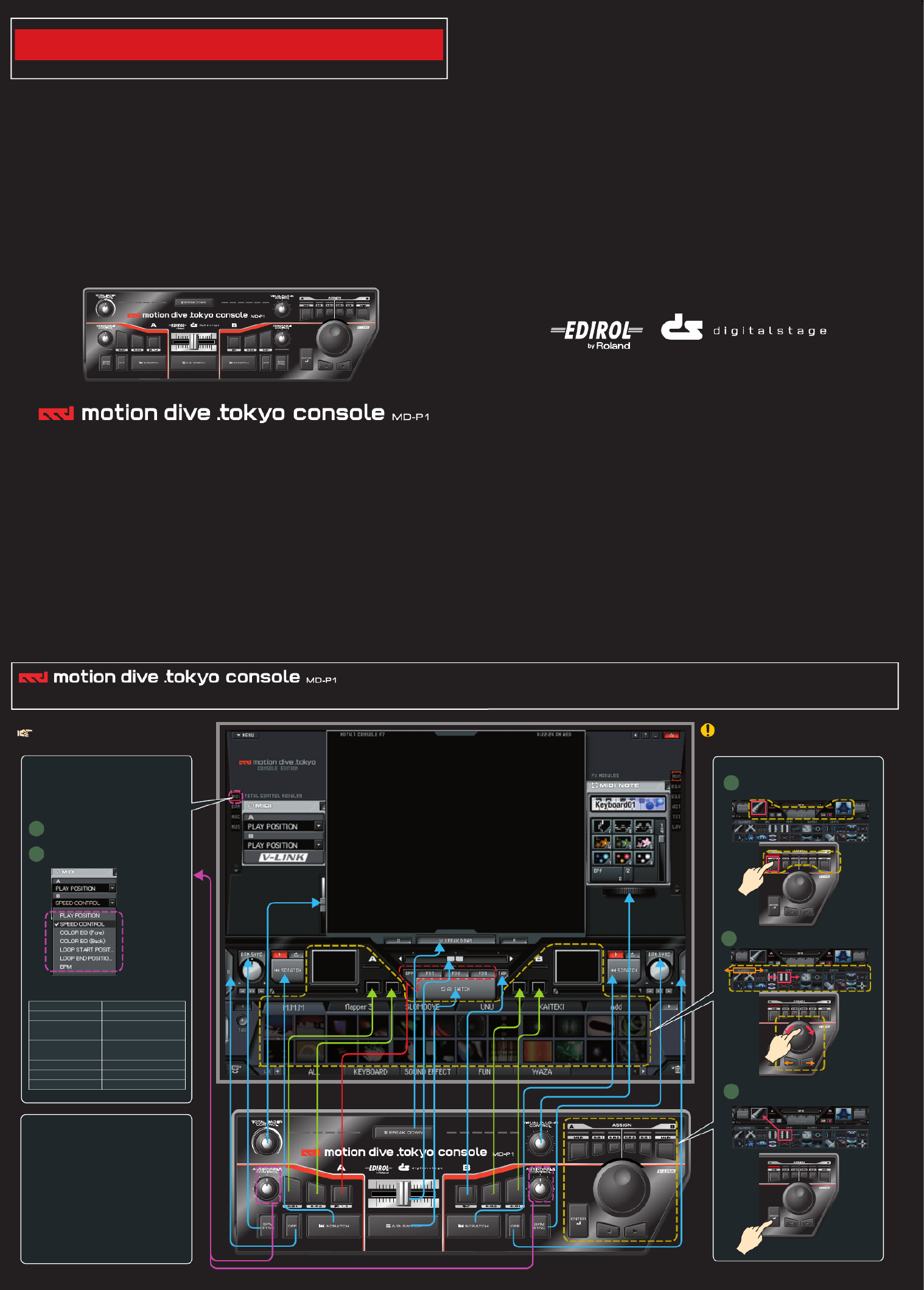
Basic Operation
Read me first
04121223 ’05-10-1N
The most important thing about this hardware console is that it’s “easy to understand.” The “motion dive .tokyo console” is designed with the
same form of interface as motion dive. Operating the “motion dive .tokyo console” is extremely simple; this page contains everything there is to
know about it.
The “motion dive .tokyo console MD-P1” is a dedicated
controller for the “motion dive .tokyo” software. Roland
provides no guarantee or support regarding its use with
any software other than “motion dive .tokyo”.
For details on using the software “motion dive .tokyo” refer to
the separate “motion dive .tokyo” manual.
2
3
1Select the target.
Select the clip.
Execute.
Selecting a clip
1
2
Assignable controls
You can assign various operations to the two knobs
A (left side) and B (right side). In the Total Control
Modules area, open MIDI to specify what you want to
assign.
Click [MIDI].
Specify what you want to assign.
The following choices are available:
• Hold down the computer’s Ctrl (control) key and turn
the MD-P1’s VISUAL PLUGIN CONTROL knob to
change the FX MODULES.
• Hold down the computer’s Ctrl (control) key and turn
the MD-P1’s TOTAL FADER CONTROL knob to
change the TOTAL CONTROL MODULES.
• Hold down the computer’s Ctrl (control) key and turn
the MD-P1’s ASSIGNABLE CONTROL knob to
adjust the ASSIGNABLE CONTROL parameter.
Operations in conjunction with the Ctrl key
PLAY POSITION
SPEED CONTROL
COLOR EQ (Fore)
COLOR EQ (Back)
LOOP START POSITION
LOOP END POSITION
BPM
Adjusts the playback point
Adjusts the speed
Adjusts the foreground
plug-in color EQ
Adjusts the background
plug-in color EQ
Adjusts the loop start point
Adjusts the loop end point
Change the BPM
Termékspecifikációk
| Márka: | Roland |
| Kategória: | nincs kategorizálva |
| Modell: | Edirol Motion Dive.tokyo Console MD-P1 |
Szüksége van segítségre?
Ha segítségre van szüksége Roland Edirol Motion Dive.tokyo Console MD-P1, tegyen fel kérdést alább, és más felhasználók válaszolnak Önnek
Útmutatók nincs kategorizálva Roland

3 Április 2025
3 Április 2025
3 Április 2025
3 Április 2025
3 Április 2025
3 Április 2025
3 Április 2025
2 Április 2025
2 Április 2025
2 Április 2025
Útmutatók nincs kategorizálva
Legújabb útmutatók nincs kategorizálva
10 Április 2025
10 Április 2025
10 Április 2025
9 Április 2025
9 Április 2025
9 Április 2025
9 Április 2025
9 Április 2025
9 Április 2025
9 Április 2025