Használati útmutató Media-Tech MT1084
Media-Tech
egér
MT1084
Olvassa el alább 📖 a magyar nyelvű használati útmutatót Media-Tech MT1084 (5 oldal) a egér kategóriában. Ezt az útmutatót 12 ember találta hasznosnak és 6.5 felhasználó értékelte átlagosan 4.3 csillagra
Oldal 1/5
POCKY NANO 2.4G
Instructions Manual
Hi-Res Wireless Optical Mouse
MT1084 EN
Package contents
■ Wireless Optical Mouse
■ USB receiver
■ User manual
Batteries are not included.
System requirements
■ Windows ME, 2000, XP or Vista
■ Free USB Port
Installation
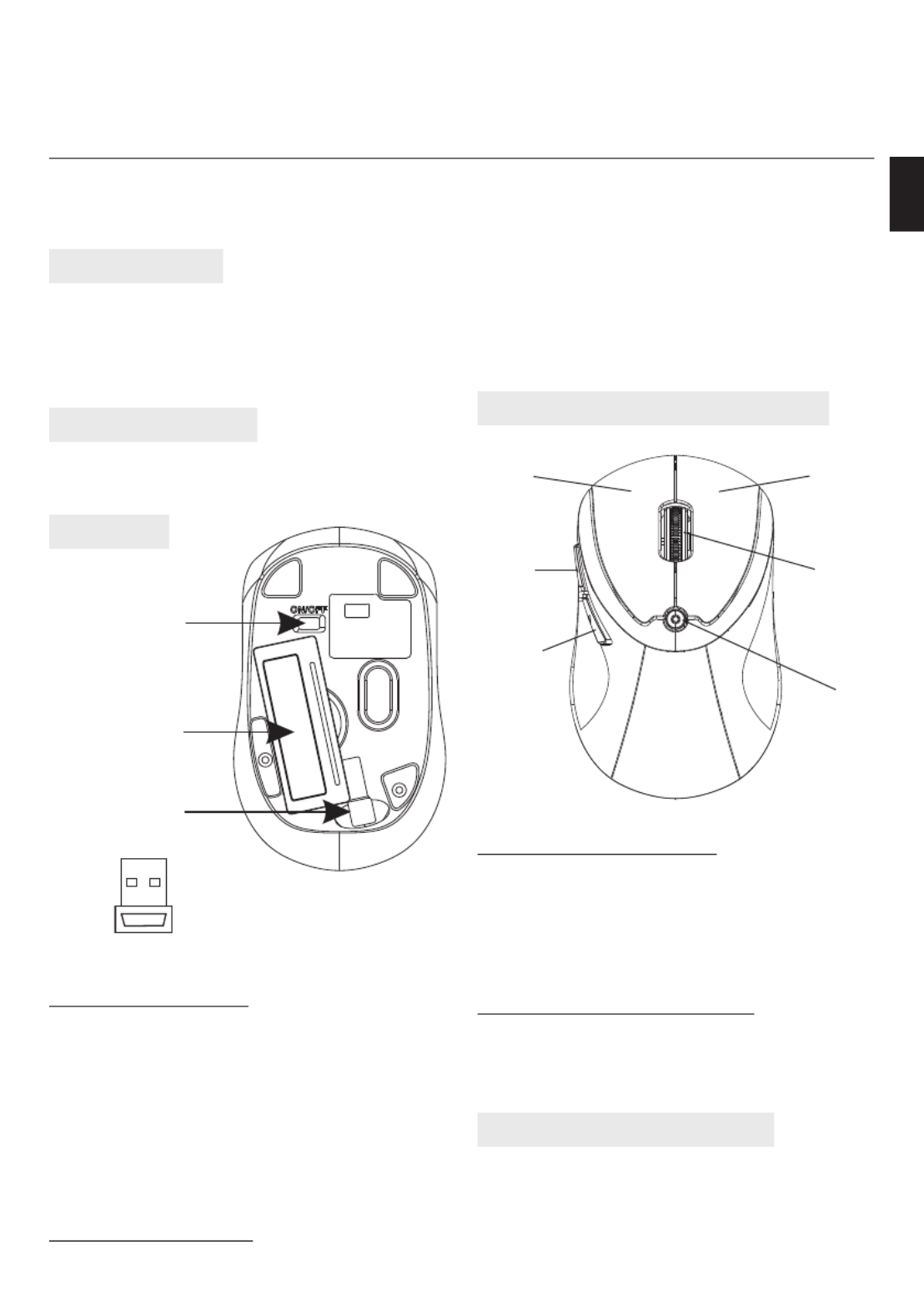
Description of keys and DPI adjusting
Installing the battery
1. Remove the battery cover.
2. Insert two AAA batteries into the battery com-
partment, make sure to properly orient the
positive (+) and negative (-) ends as speci ed
by the marks in the battery compartment. Re-
place the battery cover.
3. Switch on the mouse, the LED in bottom of
mouse will blink.
Installing the receiver
1. Insert receiver into USB port of PC, the com-
puter system will automatically detect it and
prepare it for full operation.
2. The mouse may use then. If the user wrongly
operates, please redo the above operating
procedures.
Using “DPI-adjusting key”
Using “DPI-adjusting key”, the resolution of
mouse can be switched between 800DPI and
1600DPI in turn. That LED light in “DPI-adjust-
ing key” blinks slowly indicates 800DPI and fast
1600DPI.
Backward and Frontward keys
Backward and Frontward keys for your easily
navigating forward and backward on the Inter-
net.
Low-voltage alarming function
When batteries have been used for some time
and discover the LED light in“DPI-adjusting key”
blinks automatically, which reminds you that
batteries voltage is becoming low, suggested
you replace the batteries with new ones.
ON/OFF switch
Battery cover
Position for storing
receiver
USB Receiver
Scrolling
wheel
DPI-adjusting
key
Right keyLeft key
Forward
Backward
Termékspecifikációk
| Márka: | Media-Tech |
| Kategória: | egér |
| Modell: | MT1084 |
Szüksége van segítségre?
Ha segítségre van szüksége Media-Tech MT1084, tegyen fel kérdést alább, és más felhasználók válaszolnak Önnek
Útmutatók egér Media-Tech

2 Szeptember 2024

2 Szeptember 2024

25 Augusztus 2024

25 Augusztus 2024

25 Augusztus 2024

25 Augusztus 2024

25 Augusztus 2024

25 Augusztus 2024

25 Augusztus 2024

25 Augusztus 2024
Útmutatók egér
- egér Dell
- egér Xiaomi
- egér Ozone
- egér ENDORFY
- egér Evoluent
- egér Zalman
- egér Renkforce
- egér CoolerMaster
- egér Silvergear
- egér 3M
- egér Wortmann AG
- egér Seal Shield
- egér Cherry
- egér Corsair
- egér Vultech
Legújabb útmutatók egér

8 Április 2025

3 Április 2025

30 Március 2025

30 Március 2025

30 Március 2025

28 Március 2025

28 Március 2025

28 Március 2025

28 Március 2025

27 Március 2025