Használati útmutató Intermatic ET9232
Intermatic
nincs kategorizálva
ET9232
Olvassa el alább 📖 a magyar nyelvű használati útmutatót Intermatic ET9232 (4 oldal) a nincs kategorizálva kategóriában. Ezt az útmutatót 16 ember találta hasznosnak és 8.5 felhasználó értékelte átlagosan 4.5 csillagra
Oldal 1/4
ET9232 Ethernet Module
Ethernet Module Replacement Instructions
MODEL ET9232
• Turnpoweroffatmainpanelbeforeservicingthisswitchortheequipmentitcontrols.
• Morethanonedisconnectswitchmayberequiredtode-energizetheequipmentbeforeservicing.
WARNING
Keeplow-voltagewiringseparatefromhigh-voltagewiring,includingdeadfrontmaterialbetweenwiringareas.Separate
conduitmaybeusedforlow-voltagewiringifnolinevoltagewiringispresent.
Risk of Fire or Electric Shock
Ethernet Module Replacement Guidelines
There are separate Ethernet Module replacement instructions for the one and two circuit time
switches and the 4 to 16 circuit time switches. Be sure to follow the applicable Ethernet Module
replacement instructions for your ET90000 time switch.
ReplacingEthernetModuleon1or2CircuitTimeSwitch
Follow the instructions below to replace an Ethernet Module on a 1 or 2 circuit ET90000 time switch.
1. Disconnect power to the time switch.
2. Open the time switch enclosure cabinet door.
3. At the bottom of the time switch, disconnect the Ethernet cable from the port in the Ethernet
module plastic enclosure.
4. Disconnect the Ethernet module ribbon cable connector plug from the terminal connector.
5. Remove the rivets that secure the Ethernet Module and remove the module from the plastic insulator.
6. Dispose of the rivets and module.
7. Align the new Ethernet module plastic enclosure over the holes on the plastic insulator and
secure the plastic enclosure with the rivets provided with the new module.
8. Connect the ribbon cable connector plug to the terminal connector.
9. Insert the Ethernet cable into the Ethernet port in the enclosure.
10. Close the time switch enclosure door.
11. Return power to the time switch.
CAUTION
Risk of Unintended Equipment Operation
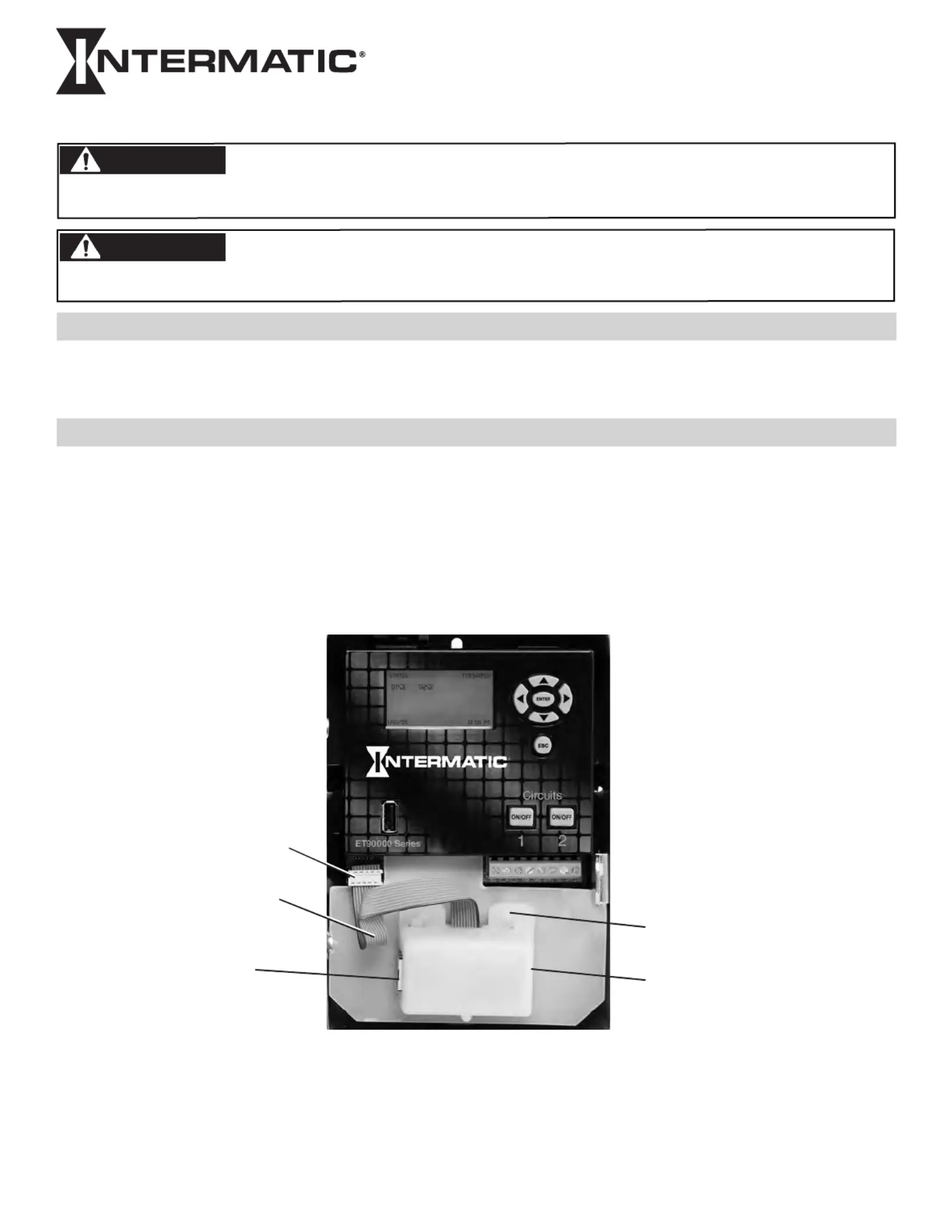
Figure 1. ET90000 with Ethernet Module components shown
Terminal
Connector
Ribbon
Cable
Ethernet
Cable port
Rivet (2)
Ethernet Module
Plastic Enclosure
Termékspecifikációk
| Márka: | Intermatic |
| Kategória: | nincs kategorizálva |
| Modell: | ET9232 |
Szüksége van segítségre?
Ha segítségre van szüksége Intermatic ET9232, tegyen fel kérdést alább, és más felhasználók válaszolnak Önnek
Útmutatók nincs kategorizálva Intermatic

8 Április 2025

8 Április 2025

8 Április 2025

8 Április 2025

8 Április 2025

8 Április 2025

8 Április 2025

8 Április 2025

8 Április 2025

8 Április 2025
Útmutatók nincs kategorizálva
- nincs kategorizálva Kunft
- nincs kategorizálva Morphor
- nincs kategorizálva Morphy Richards
- nincs kategorizálva GMW
- nincs kategorizálva Chandler
- nincs kategorizálva Masterbuilt
- nincs kategorizálva Steelbody
- nincs kategorizálva HN-Power
- nincs kategorizálva AZZA
- nincs kategorizálva IGET
- nincs kategorizálva Mybeo
- nincs kategorizálva Greenworks
- nincs kategorizálva Telmax
- nincs kategorizálva Daitsu
- nincs kategorizálva GC Audio
Legújabb útmutatók nincs kategorizálva

10 Április 2025

10 Április 2025

10 Április 2025

9 Április 2025

9 Április 2025

9 Április 2025

9 Április 2025

9 Április 2025

9 Április 2025

9 Április 2025